
1v1.LOL
Fullscreen: Desktop, Android & IOS
The Premium 1v1.LOL School Survival Guide
THE “STEALTH & BYPASS” GUIDE
Chromebooks were built for Google Docs, not for cranking 90s. If you want to run 1v1.LOL smoothly while slipping past network filters, you need to be strategic.
Schools are aggressively locking down devices using tools like GoGuardian and Lightspeed Filter. However, the system isn’t foolproof. A major vulnerability lies in how these filters read web traffic. If you use a Google Sites (G+) mirror, the school’s Deep Packet Inspection (DPI) often just sees “Google Sites activity” rather than a gaming proxy, keeping you under the radar.
Chromebook Optimization (Zero-Lag Setup):
- Kill the bloat: Hit
Shift + Escto open the Chrome Task Manager. End tasks for background extensions you aren’t actively using. - Hardware Acceleration: Make sure this is toggled ON in Chrome settings to leverage the integrated GPU.
The Panic Protocol:
If a teacher is walking down the aisle, you need an exit strategy faster than closing a laptop lid.
- The Go-To:
Ctrl + Winstantly kills the tab. - The Cloak: Use the
about:blankmethod (code below). K-12 sysadmins are fully aware of this blindspot. As one IT admin recently complained on a tech forum regarding GoGuardian: “The device loads in the page and then another frame. The management tools see the blank page and don’t see the embedded frame.” Another sysadmin confirmed that an iframe pulling from an external host “never leaves to ask proxysite for permission.” Exploit this while it remains unpatched.
MODS, CHEATS, & GLITCHES
If you’re hunting for Tampermonkey scripts to get free skins or aimbots, tread carefully. Most free extensions promising unblocked game hacks are just spyware disguised as tools.
Over on GitHub, the modding scene for this game has shifted. Developers like Zordon1337 previously released the 1v1.lol-sdkgen—an internal C# SDK generator used to map in-game fields for custom cheats. Interestingly, Zordon recently labeled it a “now dead battle royale game” when updating the repo.
Despite the shade from exploit developers, the game is far from dead, boasting over 1.9 million plays on platforms like Snokido alone. Because injecting internal cheats on a locked-down Chromebook is nearly impossible without triggering developer mode flags, your best bet is raw mechanical skill.
Pro-Level Strats (No Hacks Required):
- The JustBuild Warmup: Before jumping into a 10-player Battle Royale, spend 5 minutes in JustBuild mode. Muscle memory is your best aimbot.
- The Box Fight Meta: Rely on the Tactical Axe to demolish enemy walls, immediately switching to the Shotgun for devastating close-quarters damage.
- Custom Keybinds: The default WASD + Z/X/C/V for building is clunky on a flat keyboard. Rebind your wall and ramp to
QandEor your mouse side-buttons if you brought a peripheral to school.
THE “CLASSROOM TRIVIA” & COMMUNITY META
Educators absolutely despise HTML5 games. On Reddit’s r/teachers forum, educators literally refer to browser games as a “classroom time thief” because students simply cannot put them down.
Playing 1v1.LOL—a game explicitly built by JustPlay.LOL to mimic Fortnite mechanics—during a boring lecture is a core high school experience.
The Realities of Playing in Class:
- The Silent Sweat: Trying to play a high-intensity Box 2v2 match completely muted while the teacher explains trigonometry. You can’t hear footsteps, so your visual awareness has to be flawless.
- The Canvas Disguise: Having a decoy tab of Canvas or a half-written essay ready to swap to at a moment’s notice.
- Leaderboard Flexing: Getting first place in a Battle Royale and silently nodding to your friend across the room who watched you hit the final snipe.
QUICK EMBED / PROXY BUILDER BLUEPRINT
If your school has blocked standard domains, you can host the game yourself locally using an about:blank cloak. Sysadmins are currently trying to deploy extensions that automatically close about:blank tabs, but many schools haven’t caught up yet.
Copy this boilerplate HTML/JS script, save it as an HTML file (or run it in a clean coding sandbox), and execute it. It will pop open a completely blank window without a URL bar, embedding the game directly inside.
1v1.LOL Unblocked on GitHub: How to Play Online & Dominate the Arena
Master 1v1.LOL with our deep-dive guide. Learn how to play online, access unblocked GitHub servers, and explore stats from the JustPlay.LOL mega-hit.
In the hyper-competitive landscape of browser-based battle royales, few titles have maintained their iron-clad grip on the community quite like 1v1.LOL. It isn’t just a passing fad. Developed by Ramat Gan-based studio JustPlay.LOL—which was notably acquired by gaming giant Playtika in 2022—this third-person shooter and building simulator has quietly amassed over 80 million downloads worldwide. But while its official app dominates the Android and iOS storefronts, a parallel ecosystem thrives in the shadows: the “unblocked” GitHub servers.
If you are trying to figure out how to play 1v1.LOL online, or you are simply looking to bypass restrictive networks to get your daily dose of box fights, you have come to the right place.
The Engine Behind the Mayhem
What exactly makes 1v1.LOL so addictive? The magic lies in its proprietary blend of resource-light accessibility and a tremendously high skill ceiling. JustPlay.LOL engineered the game to deliver an action-adventure survival mode where quick reflexes are paramount. You are not just shooting; you are constructing tactical cover in real-time.
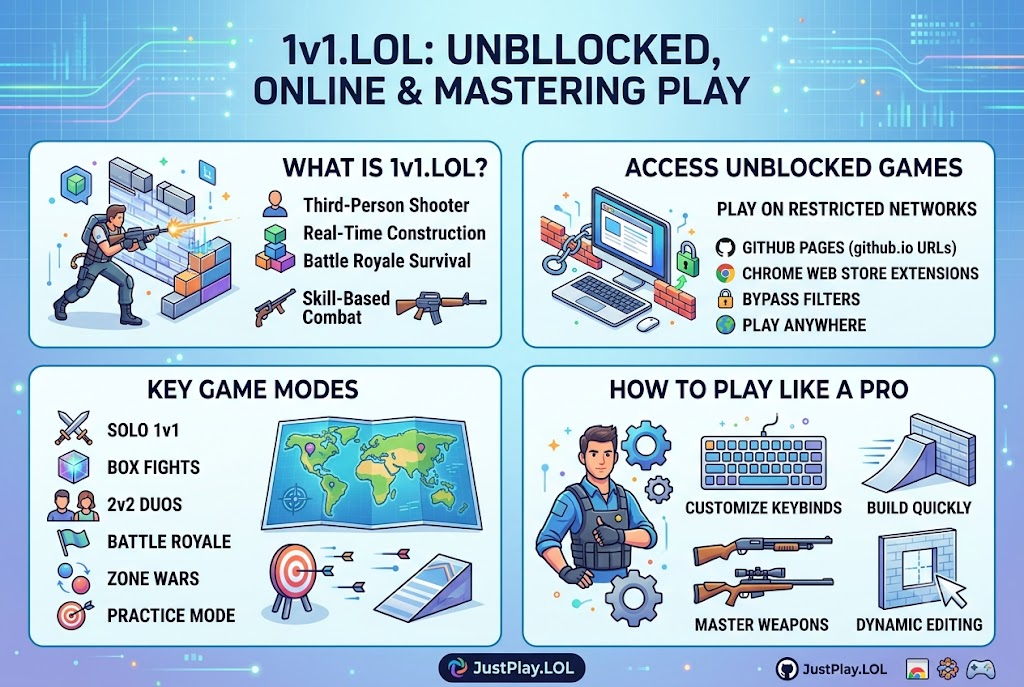
Players can jump into a variety of modes directly from their browsers, Windows, Mac, or mobile devices. The primary offerings include classic Solo 1v1s, 2v2 duo battles, expansive Battle Royales, Zone Wars, and intense Box Fights. The core gameplay loop forces players to unlock superior weapons and rapidly deploy ground, wall, and ramp constructions to survive hostile crossfire.
How to Play 1v1.LOL Online (And Actually Win)
Here is the strategic breakdown for new competitors:
- Master the Grid: 1v1.LOL utilizes an intuitive building system. Your left joystick (on mobile) or WASD keys (on PC) control movement, while specific hotkeys drop platforms. Practice alternating between your shotgun and your building plans seamlessly.
- Control Customization: The game allows players to modify their HUD and keybinds from the main menu. Serious players remap their build keys to easily accessible mouse buttons or nearby keyboard keys to shave milliseconds off their reaction times.
- Leverage Practice Mode: Before diving into ranked 2v2s or private custom matches with friends, utilize the offline Practice Mode to refine your 90-degree turns and defensive box building.
The GitHub Phenomenon: Accessing 1v1.LOL Unblocked
Let’s address the elephant in the room. A massive portion of 1v1.LOL’s daily active users play from environments with aggressive network firewalls, such as corporate offices or school campuses. This restriction birthed the “1v1.LOL Unblocked” movement.
Because the game is relatively lightweight (running heavily on JavaScript, HTML, and CSS frameworks), independent developers frequently fork HTML game templates and host them on GitHub Pages (github.io). By doing so, they create mirror sites that bypass traditional web filters.
Furthermore, the Chrome Web Store is flooded with extension-based versions of the game. Extensions like the “1v1.LOL Offline and Popup Version” provide an ad-free, fullscreen gaming experience that requires no persistent internet connection once cached. This decentralized distribution model is exactly why the game remains ubiquitous. Players continually hunt for these GitHub repositories and .io domains to ensure they never miss a match.
Key Takeaways for Quick Reference
- Developer Pedigree: Created by Israel-based studio JustPlay.LOL (acquired by Playtika in 2022).
- Player Base: Surpassed 80 million global downloads across all major platforms.
- Core Mechanics: Combines third-person shooting with real-time structural building and editing.
- Game Modes: Solo 1v1, 2v2 Duos, Battle Royale, Box Fights, and Practice Mode.
- Unblocked Access: Widely accessed via GitHub.io HTML mirrors and Chrome Web Store extensions to bypass institutional network restrictions.
Winning in 1v1.LOL requires a dual-focus strategy. You must master the gunplay while simultaneously manipulating the environment.
- How do I play 1v1.LOL unblocked at school?
Most users bypass network restrictions by searching for “1v1.LOL unblocked github” to find user-hosted HTML mirrors on GitHub Pages (github.io). Alternatively, installing a 1v1.LOL offline extension directly from the Chrome Web Store often allows for popup, ad-free play that circumvents local network firewalls.
- Is 1v1.LOL completely free to play?
Yes. The game operates on a free-to-play, proprietary license model. While it is ad-supported across web and mobile platforms, players can access the full suite of weapons and game modes without paying. Optional ad-removal features exist on third-party distribution platforms like Uptodown Turbo.
Sources Quoted: Data and developmental history were sourced from JustPlay.LOL organizational profiles (The Org), web distribution metrics from the Chrome Web Store, and application details via Uptodown and WebCatalog.
- Reddit
r/k12sysadminandr/sysadminforums (quotes regarding GoGuardian, Lightspeed Filter bypasses, and iframe/about:blankmechanics). - AnySecura (quote referencing
r/teachersclassifying browser games as a “classroom time thief”). - GitHub (Zordon1337 repo
1v1.lol-sdkgenquote regarding the game’s status). - Snokido / ActivePlayer.io (player count statistics).
- JustPlay.LOL (developer data).