A severe technical disruption paralyzed Microsoft’s gaming network this Monday morning, abruptly cutting off thousands of players from their digital libraries and online multiplayer lobbies. It was a sudden, jarring halt. Gamers attempting to access titles across multiple regions were instead greeted by failed loading screens and a persistent, cryptic message: the 0x87e107df error code.
Monitoring platforms registered a steep influx of complaints scaling past 2,000 active reports early in the day. During the peak of the disruption, metrics indicated that upwards of 3,000 users were facing immediate, hard-stop connectivity issues. While service hiccups are an expected hazard of the modern digital gaming era, the widespread nature of this particular blackout—and the total lockdown of localized game libraries—has triggered immense community frustration.
The Anatomy of the 0x87e107df Error
The root of today’s chaos manifests primarily through the 0x87e107df error code. If you are staring at this alphanumeric string on your television, you are far from alone.
But what exactly is it?
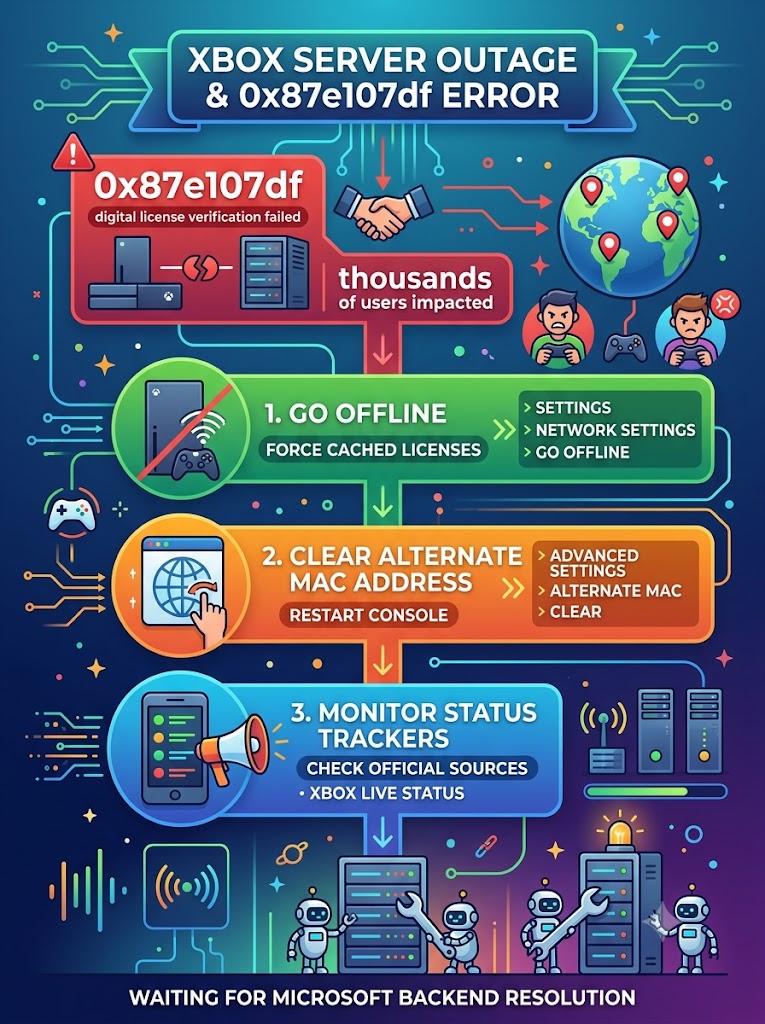
According to official Xbox documentation, this specific error code “usually happens when Xbox Live cannot verify digital game licenses due to a service outage or connection glitch”. In layman’s terms: modern consoles require a continuous handshake with corporate backend servers to verify that you actually own the digital games installed on your hard drive. When the Xbox network goes down, that digital handshake fails. The console assumes you lack the rights to launch the game, slamming the door shut even on single-player campaigns.
Multiple players reported exactly this phenomenon, noting they were entirely unable to start their installed games despite their consoles appearing to still have a basic connection to Xbox Live.
Why a User-End Fix Likely Won’t Save You
Desperation breeds experimentation. All morning, frantic gamers have attempted everything from hard console resets and disconnecting power cables to deeply altering their internet configurations.
The reality? Most of these local workarounds are currently completely ineffective.
Because the root breakdown originates squarely on Microsoft’s corporate side, manipulating your home hardware is essentially trying to fix a broken dam by changing your faucet. As telemetry teams investigate the underlying trigger, normal operations will only resume automatically once backend servers successfully clear the massive authentication backlog and restore stable verification protocols.
Compounding the anxiety within the global gaming community is the distinct absence of official communication. Dedicated support branches delayed issuing formal statements acknowledging the disruption or providing an estimated timeframe for a full service recovery, leaving players to crowdsource their own diagnostics.
How to Fix the ‘0x87e107df Error’ (Official Workarounds)
Despite the corporate-side origin of the outage, official Xbox guidelines do offer a few potential fixes to combat the 0x87e107df error. While a user-end fix is unlikely to succeed while the primary servers remain entirely dark, players can attempt the following diagnostic steps as network stability slowly returns:
- Go Offline in Network Settings: By far the most effective temporary bypass for single-player titles. Navigate to your Xbox network settings and manually switch the console to ‘Offline’ mode. This forces the hardware to rely on its localized cached licenses rather than constantly checking the currently broken live servers.
- Clear the Alternate MAC Address: A long-standing community troubleshooting trick. Navigate to Settings > Network Settings > Advanced Settings. Select “Alternate MAC Address” and click “Clear.” You will be prompted to restart your console.
- Monitor Official Server Trackers: Stop trying to reset your router. Instead, keep a close eye on third-party outage monitors like Downdetector or the official Xbox Live Status page.
If you have attempted resetting your console while choosing to keep games and apps, and the error persists, there is nothing left to do but wait. Community moderators and telemetry feeds will continue to provide updates as the situation evolves across international servers. Until Microsoft patches the authentication backlog on their end, the 0x87e107df error will remain an unmovable digital bouncer for thousands of affected gamers.
Sources Quoted:
Data, expert guidelines, and community reports were extracted and synthesized from Kursiv Media, Hindustan Times, Geo.tv, Downdetector, and the official r/XboxSupport community on Reddit.

Leo Falsafi is a digital marketing veteran and senior journalist at Virlan.co, where he covers the intersection of digital marketing, gaming, and breaking US trending news. With nearly two decades of hands-on experience in SEO and digital strategy, Leo has consulted for and scaled hundreds of companies. His deep industry roots allow him to deliver sharp, fact-checked insights and analysis on the trends shaping today’s digital landscape.