What is “Follow Us On Google” & How to Add a Preferred Source?
For most of the last two decades, SEO has been a game of probabilistic signals. We optimize Core Web Vitals, restructure JSON-LD, and chase semantic relevance, hoping the algorithm rewards us. But the landscape shifted violently with the rollout of AI Overviews, leaving many publishers asking a simple question: We rank on page one—so why isn’t any traffic coming through?
The answer lies in a paradigm shift from algorithmic guesswork to deterministic, user-driven visibility. Enter Google’s “Follow” capability and the rapidly expanding “Preferred Sources” feature.
These aren’t just vanity metrics. They are engineered retention loops designed to bypass algorithmic volatility, surfacing your content directly to loyal readers across Google Discover, Top Stories, and—as of a major update in May 2026—straight inside AI Overviews.
What is the Google Discover “Follow” Feature?
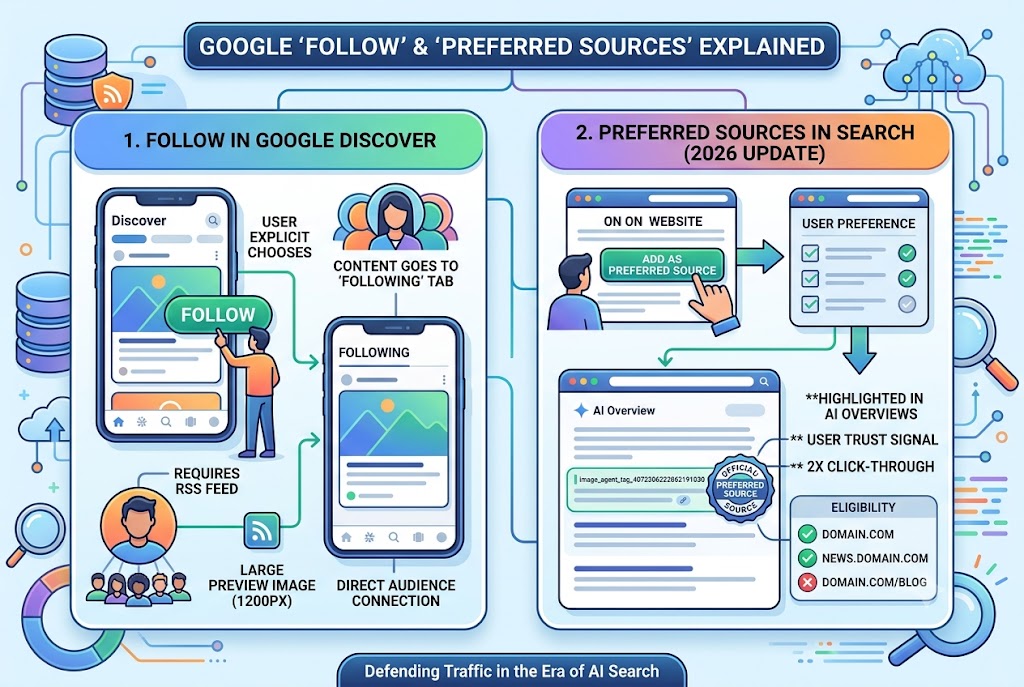
At its core, the Google “Follow” button allows users to explicitly subscribe to a website or creator directly from a card in their Google Discover feed.
When a signed-in user taps the “Follow” button, they signal a direct, conscious choice to see more of your content. This action populates a dedicated “Following” tab within their Discover environment, creating an isolated feed composed strictly of publishers they have manually selected. More importantly, it unlocks a “Creator Dedicated Space”—a unified entity profile that aggregates your website articles, videos, and social media under one roof.
The Technical Backbone:
Unlike traditional ranking levers, the Follow feature is heavily reliant on your site’s RSS or Atom feed. If you don’t explicitly define one using a <link> tag in your HTML head, Google attempts to auto-generate it. For optimal Discover performance, your pages must also utilize the max-image-preview:large meta tag and feature high-quality images at least 1200 pixels wide.
The 2026 Evolution: What are Google Preferred Sources?
While the Discover Follow feature builds an audience, the “Preferred Sources” feature weaponizes that loyalty directly within traditional Google Search.
Initially rolled out in late 2025 for Top Stories, the feature experienced a massive expansion on May 27, 2026. Google Search Product Manager Duncan Osborn announced that Preferred Sources now actively appear inside AI Overviews and AI Mode, prominently marked with a distinct visual label.
If one of your pages is cited as a source in an AI-generated summary, and the searcher has previously set you as a preferred source, your link is visually highlighted. This is a rare, tangible defense against AI traffic loss.
The data backs up the strategy. According to Google’s May 2026 announcements, over 345,000 sources have already been selected by users, and searchers are twice as likely to click through to a link marked as a preferred source.
Eligibility and Technical Setup
Unlike the Follow feature’s reliance on RSS feeds, Preferred Source eligibility requires zero structured data. It is determined automatically by Google based on domain reputation.
However, there is a strict architectural limitation: Only root domains (e.g., example.com) and subdomains (e.g., news.example.com) qualify. Subdirectories (like [example.com/blog](https://example.com/blog)) are entirely unsupported.
How to Build the “Add as a Preferred Source” Loop
Because this is a user-driven mechanism, the algorithm won’t do the heavy lifting for you. You must engineer the conversion loop yourself.
Google provides official badge assets in 16 languages, which you can place in high-visibility areas like end-of-article CTAs, author boxes, or newsletter footers.
To create the mechanism:
- Verify your root domain is eligible.
- Download the official badge or build a custom HTML/CSS button.
- Link the button directly to Google’s preference panel using this URL structure:
[https://www.google.com/preferences/source?q=your-domain.com](https://www.google.com/preferences/source?q=your-domain.com).
When a user clicks this link, it opens their Google source settings with your domain pre-filled, drastically reducing the friction required to lock in their preference.
Why This is the Ultimate E-E-A-T Signal
We often talk about Experience, Expertise, Authoritativeness, and Trustworthiness as signals we must prove to a crawler. Preferred Sources flip that dynamic. It transforms your E-E-A-T into a user-facing tool.
Getting a reader to explicitly click “Follow” or “Add as a preferred source” is the ultimate deterministic signal. It tells Google that regardless of broader algorithmic shifts, this specific user trusts your brand above the noise. In a search environment increasingly dominated by zero-click AI summaries, converting rented search traffic into explicitly opted-in audiences is no longer an edge case—it is the foundation of independent digital survival.
Sources Quoted:
This article sourced data, structural requirements, and May 2026 updates from the official Google Search Central Blog (via Duncan Osborn), SEO-Kreativ.de (July 2026 reporting), OneStream Live, and David Breder’s SEO Tools documentation.
Leo Falsafi is a digital marketing veteran and senior journalist at Virlan.co, where he covers the intersection of digital marketing, gaming, and breaking US trending news. With nearly two decades of hands-on experience in SEO and digital strategy, Leo has consulted for and scaled hundreds of companies. His deep industry roots allow him to deliver sharp, fact-checked insights and analysis on the trends shaping today's digital landscape.