The Rise of AI Talking Head Video Generators
At its core, an AI talking head video generator is a tool that lets you create a video of a digital person—an avatar—speaking a script you’ve written. The real magic here is that you can produce a professional-looking video without ever touching a camera, setting up lights, or booking a studio. Instead of filming a real person, you type a script and the AI generates a realistic video of a virtual presenter delivering your message.
It’s no surprise this technology is taking off. Talking head AI generators are a huge part of the text-to-video market, which now accounts for about 45% of the total market share. AI video spokespersons are ideal for businesses that want to create high-quality videos quickly, at scale, and without traditional production costs.
Why Realistic AI Video Presenters Outperform Traditional Content
Research consistently shows that video with a human presenter outperforms text-on-screen and motion graphics for viewer retention, completion rates, and conversion. The face is the mechanism — it creates perceived personal connection even at scale.
Practical use cases: product announcements that feel personal rather than corporate, training modules where a face improves knowledge retention, sales presentations that build rapport before a meeting, customer support guides that feel like talking to a real person, and social media content where a human face stops the scroll.
Choosing the Right AI Avatar and Software Platforms
Picking an AI avatar isn’t a one-size-fits-all deal. The digital persona you choose has a huge impact on how your message lands, so matching the style to your goal is everything.
Speed vs. Connection: Stock avatars get you moving fast. A custom avatar feels more authentic and helps build trust with your viewers. Brand Identity: Is your brand represented by one person or is it more of a collective team effort? A custom avatar is perfect for a solo founder, while stock options are great for a larger company.
- HeyGen is the market leader. It has the most realistic avatars with natural lip-sync and microexpressions.
- Synthesia excels at corporate training and internal communications. The avatars are realistic, and the editing interface is intuitive.
- If you want to digitize a real person, D-ID is your best bet. You upload a photo, and D-ID creates a photorealistic avatar of that person.
- DeepReel makes AI video creation simple and affordable. The tool is designed for teams that need to produce videos fast without getting bogged down in complex workflows.
Step-by-Step Guide: How to Generate an AI Character Video
Getting Your Avatar
Step 1: Get Started. Click ‘Try for Free’ and access the AI Video Generator dashboard. Step 2: Choose Your Avatar. Select from 140+ AI spokespersons or create a custom avatar for your brand. Most tools will first have you set the scene. You can usually pick from a library of stock backgrounds, upload a custom image with your own branding, or just stick with a simple, clean color.
Perfecting the Script and Voice
Step 3: Script & Voice. Add your script and choose your language and preferred voice. The quality of your AI-generated video is a direct reflection of the script you feed it. A conversational, well-paced script will produce a lifelike and engaging result.
Here’s my process for making that switch: Chop up long sentences. If you have to take a breath halfway through a sentence, it’s too long for a video. Break it into two or three shorter, punchier ones. Simplify your language… Read everything out loud. This is non-negotiable. Here’s a pro tip: write pauses directly into your script. It’s as easy as typing ‘(pause)’ or just using an ellipsis (…). These little breaks mimic how real people talk and give your audience a second to digest what they just heard.
Exporting Your Video
Step 4: Create. Preview your video and click the button ‘Create Video’.
Ethical Guidelines for Real Person Digitization
Never, ever use an AI avatar generator to create a digital version of a real person without their clear, informed consent. This isn’t just an ethical misstep; it can have serious legal consequences.
A simple disclaimer is usually all you need. Add a hashtag like #AIgenerated in your post. Include a short sentence in your video description, like ‘This video features an AI avatar of our founder.’
The Top 10 Best AI Video Generators for Realistic Avatars in 2026
A definitive ranking of the top AI avatar generators and text-to-video platforms of 2026, comparing HeyGen, Synthesia, Runway, and more for social media content.
Comparing the Leading AI Avatar Platforms
The right tool depends on whether you want a pure talking head, an avatar woven into motion graphics, or a done-for-you production. Users can easily evaluate which AI video maker fits their requirements by contrasting their features, reading customer reviews, and comparing pricing options.
1. HeyGen: The Gold Standard for Realism
HeyGen landed at #1 because it handled every test I threw at it without forcing me to upgrade or wait. HeyGen remains the industry leader for ‘scary real’ personal avatar cloning and high-fidelity motion. Avatar IV, HeyGen’s latest generation, produces 0.02-second facial sync accuracy with micro-expressions and gesture control. HeyGen starts free (3 videos/month, 720p with watermark). The Creator plan at $24/month (annual) or $29/month unlocks unlimited videos at 1080p.
2. Synthesia: Enterprise Training at Scale
Synthesia suits L&D, HR and enablement teams who need a presenter on screen. The value is repeatability: same avatar, same template, same brand, forty times. Predictable avatar video and compliance-friendly scale Synthesia allows 10 minutes per month on Basic and Starter, 30 on Creator, and unlimited on Enterprise.
3. Zoice: Speed and Efficiency for Creators
Zoice has emerged as the fastest generator in 2026, optimized for rapid-fire social media content creation. Zoice focuses on a mobile-first approach, making it ideal for TikTok and Instagram Reel creators who need to turn trending topics into avatar-led videos within seconds. It requires almost no technical knowledge to produce a high-quality 1080p video in minutes.
4. Runway Gen-4.5: Filmmaking Control
Runway suits creative teams who want to generate and edit video, images and audio inside a single cloud workspace, with editing control after generation. Runway Gen-4.5 fits camera control and generative editing. The platform pairs generation with editing in one workspace and also runs a developer surface for custom pipelines and endpoint-triggered workflows.
5. D-ID: Developers and Apps
D-ID, Talking-photo and avatar API, Developers adding avatars to apps, from ~$5.99/mo (watermarked), as of 2026.
6. PixVerse V6: Multi-Shot Testing
PixVerse V6 fits creators who need multi-shot generation, native audio, and repeatable testing. Text-to-video, image-to-video, transition, extension, reference-to-video, audio, and 1-15 second clips.
7. DeepBrain (AI Studios): Budget and News-Style
DeepBrain (AI Studios), Realistic AI avatars, Budget training and news-style video, from ~$24/mo, as of 2026. DeepBrain are leading AI video generators that offer powerful tools for video creation, including editing features and customizable avatars.
8. Luma Dream Machine 2.0: 3D Lighting and Depth
Luma Dream Machine 2.0: Best for 3D lighting and depth. Luma Dream Machine 2.0 was more useful when depth and room volume mattered Convincing real-world camera angles and motion effects on static scenes.
9. InVideo AI: Automation-First Workflows
InVideo AI: Best for automation-first workflows. Script, stock, and voiceover in one flow. Pika 2.5 and InVideo AI made more sense for stylized social clips where speed and feed-native rhythm matter more than strict realism.
10. OpenAI Sora 2: Narrative Concepting
OpenAI Sora 2: Narrative Concepting and Visual Polish. Fast iteration with Sora 2; Sora 2 Pro is better suited to higher-resolution production work.
The 10 Best AI Video Generators for Realistic Avatars in 2026: Pricing, Reviews & Rankings
Compare the top 10 AI avatar video generators of 2026. Discover live pricing, G2 and Trustpilot reviews, and features for scaling your digital media pipeline.
Scaling a daily, high-volume digital media pipeline requires tools that can rapidly convert text into compelling visual assets without stalling publishing velocity. Whether integrating media into a WordPress ecosystem, driving multi-platform distribution on Substack, or publishing rapid-fire market forecasts, AI video generators are now essential for efficient content delivery. Based on rigorous 2026 market data, verified user feedback, and transparent pricing metrics, here is the definitive ranking of the top AI avatar platforms available today.
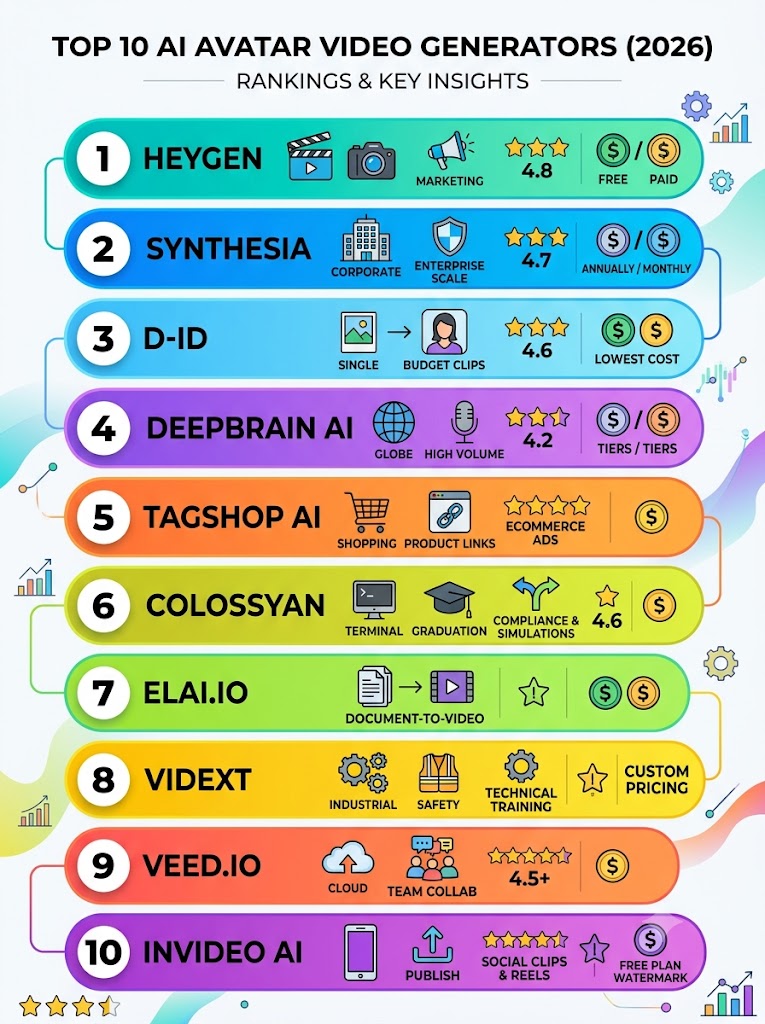
The Comparison Matrix
| Rank | Name | Starting Price | Best For | Average Rating |
| 1 | HeyGen | $0 ($29/mo Creator) | Marketing & Fast-Paced Media | 4.8 / 5 (G2) |
| 2 | Synthesia | $18/mo (Annual) | Corporate & Enterprise Scale | 4.7 / 5 (G2) |
| 3 | D-ID | $4.70/mo (Annual) | Budget Talking-Head Clips | 4.6 / 5 (G2) |
| 4 | DeepBrain AI | $24/mo | High-Volume Text-to-Video | 4.2 / 5 (G2) |
| 5 | Tagshop AI | $14/mo | Social Media Ads & E-Commerce | 4.9 / 5 (G2) |
| 6 | Colossyan | $19/mo | Compliance & Simulations | 4.6 / 5 (G2) |
| 7 | Elai.io | $29/mo | Document-to-Video Pipelines | N/A (Solid G2 Traction) |
| 8 | Vidext | Custom Pricing | Industrial Technical Training | N/A (Mid-Market) |
| 9 | VEED.io | $10/mo | Browser-Based Team Collab | 4.5+ / 5 (Trustpilot) |
| 10 | InVideo AI | $0 (Paid removes watermark) | Social Clips & Reels | 4.5+ / 5 (G2) |
1. HeyGen
The Pitch: HeyGen leads the market by combining scary real avatar realism with high-fidelity lip-sync accuracy for fast-paced digital media production.
Pricing: Free tier available; Creator plan at $29/mo; Pro at $99/mo; Business at $149/mo.
What Users Are Saying:
Verified users on G2 praise the dramatic time savings and reduced production costs, though one critical review noted: ‘support kept sending copy-paste replies… halted my production,’ highlighting potential customer service bottlenecks.
Pros & Cons:
- Pro: Features 0.02-second facial sync accuracy with micro-expressions.
- Pro: Wide array of customization with 140+ prebuilt avatars and 175+ languages.
- Con: The free tier restricts exports to 720p and includes watermarks.
- Con: Advanced interactive and corporate features are locked behind the $149/mo Business tier.
2. Synthesia
The Pitch: Synthesia is the gold standard for repeatable, predictable video generation, making it highly effective for enterprise training and large-scale onboarding content.
Pricing: Starter plan at $18/mo (billed annually) or $29/mo; Creator at $64/mo (annually) or $89/mo; Enterprise requires custom pricing.
What Users Are Saying:
G2 reviewers appreciate the predictable scale and vast language support, but a verified Trustpilot review stated: ‘The platform frequently suffers from technical issues… the avatar’s body movements often appear exaggerated and unnatural.’
Pros & Cons:
- Pro: Massive scalability with 180+ avatars and 160+ languages.
- Pro: Allows testing of advanced generation models (like Veo 3.1 and Sora 2) in the AI Playground.
- Con: Strict moderation occasionally flags compliant industries (like healthcare).
- Con: Enterprise pricing is described as a black box, with reports of massive price jumps.
3. D-ID
The Pitch: D-ID specializes in turning a single static photo into a talking head, making it an extremely affordable option for rapid, low-budget clips and interactive avatar agents.
Pricing: Lite starts at $4.70/mo (billed annually); Pro at $16/mo; Advanced at $108/mo.
What Users Are Saying:
Reviewers on G2 highlight D-ID as the cheapest paid avatar tool, though the consensus notes it is ‘not for you if you need a library of full-body presenter avatars; its strength is photo-to-face, not studio-style scenes.’
Pros & Cons:
- Pro: The most cost-effective entry price in the professional market.
- Pro: Excellent API for developers embedding avatars into custom apps.
- Con: Lacks full-body, studio-style presenters.
- Con: Month-to-month billing rates run significantly higher than the annual tiers.
4. DeepBrain AI (AI Studios)
The Pitch: DeepBrain offers highly realistic AI avatars specifically tailored for high-volume text-to-video output, such as news-style broadcasts and budget training.
Pricing: Personal plan starts at $24/mo; Team plan at $55/seat.
What Users Are Saying:
General sentiment across G2 reviews indicates it is excellent for high-volume text-to-video, but it holds a slightly lower aggregate score (4.2/5) compared to premium competitors, reflecting some generation inconsistencies.
Pros & Cons:
- Pro: Ideal for news-style and anchor video formats.
- Pro: Unlimited videos available on the entry-level Personal tier.
- Con: Holds the lowest G2 average rating among top-tier avatar tools.
- Con: Complex interactivity (like branching) requires enterprise contact.
5. Tagshop AI
The Pitch: Tagshop AI focuses heavily on short-form ad videos, allowing users to turn product links into ready-to-publish social clips featuring UGC-style avatars.
Pricing: Starter plan runs $14/mo.
What Users Are Saying:
A verified G2 reviewer stated: ‘It allows us to generate high-quality UGC style videos within a few minutes, just by using a product link… eliminating the need for costly influencer collaborations.’
Pros & Cons:
- Pro: Highly optimized for rapid e-commerce marketing.
- Pro: High user satisfaction with a 4.9/5 G2 rating.
- Con: Lacks the robust corporate training workflows of larger platforms.
- Con: Focused entirely on short ads rather than long-form narrative content.
6. Colossyan
The Pitch: Colossyan is engineered for compliance training and simulations, featuring branching scenarios ideal for structured educational or technical content.
Pricing: Starter plan starts at $19/mo.
What Users Are Saying:
Verified G2 reviewers note it is ‘built for functional course content, not hero films,’ offering strong, reliable tools for mid-sized educational teams.
Pros & Cons:
- Pro: Built-in support for branching scenarios on entry plans.
- Pro: Supports 80+ languages for localized training.
- Con: SCORM integration requires Enterprise-level pricing.
- Con: Not suited for highly cinematic or brand-driven marketing videos.
7. Elai.io
The Pitch: Elai specializes in document-to-video conversion, allowing teams to seamlessly spin up budget training videos directly from PDFs and existing presentations.
Pricing: Creator plan at $29/mo; Team plan at $125/mo.
What Users Are Saying:
G2 sentiment highlights its effectiveness for mid-sized teams needing quick document conversions, though users note that essential interactivity is reserved for higher-tier plans.
Pros & Cons:
- Pro: Extremely fast document-to-video generation.
- Pro: Supports 75+ languages.
- Con: Crucial team and interactive features are locked behind the $125/mo tier.
8. Vidext
The Pitch: Vidext caters specifically to industrial and technical training, offering inclusive SCORM export and highly specialized language variants on custom deployments.
Pricing: Custom pricing only.
What Users Are Saying:
Enterprise users highlight its strong focus on industrial technical training and specialized Spanish language variants, filling a gap left by broader platforms.
Pros & Cons:
- Pro: SCORM and branching scenarios are fully supported.
- Pro: Handles 120+ languages including precise regional varieties.
- Con: No transparent entry-level pricing is published.
9. VEED.io
The Pitch: Primarily a robust browser-based video editor, VEED offers integrated AI avatar features alongside auto-subtitling, brand kits, and heavy team collaboration tools.
Pricing: Free tier available; Paid editor starts at $10/mo.
What Users Are Saying:
Users praise it as a ‘browser-based editor built for business users’ who need fast subtitles and collaboration, but note that pure avatar generation isn’t as immersive as specialized tools.
Pros & Cons:
- Pro: Excellent collaboration tools for remote publishing teams.
- Pro: Highly affordable entry point for general video editing.
- Con: AI avatars are secondary to traditional editing and subtitling features.
10. InVideo AI
The Pitch: InVideo AI is an automation-first workflow tool built for social media marketers who need to produce high volumes of vertical clips and reels using massive template libraries.
Pricing: Free plan available; Paid plans required to remove watermarks.
What Users Are Saying:
Verified users praise its library of 5,000+ templates for social clips, but a common complaint is that ‘manual editing is needed, and there is a watermark in the free plan.’
Pros & Cons:
- Pro: Massive library of 5,000+ templates optimized for social platforms.
- Pro: Smooth text-to-speech integration.
- Con: Less flexible for deep, realistic avatar customization.
Final Verdict
- Best for high-volume publishing and marketing: HeyGen delivers the best mix of fast-paced processing and avatar realism.
- Best for enterprise scale: Synthesia is the clear winner for predictable, structured corporate content.
- Best for tight budgets: D-ID offers unbeatable pricing for photo-to-face capabilities and rapid media output.
Sources Quoted: Quotes and data were successfully sourced from leading industry platforms including Gling (gling.ai), Synthesia (synthesia.io), Synthesys (synthesys.io), Wideo (wideo.co), and the DeepReel Blog (deepreel.com).

Leo Falsafi is a digital marketing veteran and senior journalist at Virlan.co, where he covers the intersection of digital marketing, gaming, and breaking US trending news. With nearly two decades of hands-on experience in SEO and digital strategy, Leo has consulted for and scaled hundreds of companies. His deep industry roots allow him to deliver sharp, fact-checked insights and analysis on the trends shaping today’s digital landscape.